

By: Hillel Fuld
Yesterday, just in case you were not online, was Apple’s annual WWDC event. I wrote how Apple’s announcements won’t really change anything for the industry. I was wrong! The enhancements Apple made to iOS, Mac OS, and the entire Apple ecosystem were, yes I am using this word, revolutionary. I tweeted the announcements as they happened, so if you want to get up to date before reading this post, you can read my tweets here. You can also read about iOS 5 on Apple.com here.

There are over 200 new features in iOS 5, 250 in OSX Lion, and the new iCloud service, so suffice to say, despite the lack of a new iPhone, yesterday’s event wowed pretty much everyone. I would love to single out one feature that is the most game-changing for me in iOS 5, but unfortunately, I am unable to, as there are so many that will change the way I use my iOS devices. Notifications is a huge one, but so is the new Mail interface, the new iMessage platform, the enhancements Apple made to the camera and its feature set, as well as the full and deep Twitter integration into iOS 5. The list goes on and on, Apple did a great job with this release.
What is really interesting is that the new iOS, with all its features will essentially lead me and many other users to delete different apps that prior to iOS 5, provided a certain functionality that is now part of the operating system itself. In fact, take a look at this post, 8 Apps That Should Have Been Part of iOS and Apple Should Now Buy, I wrote a few months back, seems like Apple was listening… Except Apple did not buy these companies/apps, they essentially destroyed them.

Just to clarify, I do not really believe that apps like Dropbox or Instagram, with their millions of users, will really close up shop tomorrow, but I do believe they will suffer from the new integrated features of iOS 5. More people will use iCloud instead of Dropbox as well as the integrated photo sharing/editing capabilities instead of using Instagram. I would have been a lot happier if Apple would have gone on a shopping spree and snatched up all these amazing companies, but as a consumer, I am very excited to try all the new features included in iOS 5.
The following is a list of app categories, represented by one example, that will surely suffer from the new and integrated features in iOS 5, which Steve Jobs announced yesterday:
1: Boxcar (Notification Apps): One of my all time favorite apps, not because it is great, but because it was needed. All my notifications including email, Twitter, Facebook, and many others are pushed to me using Boxcar. The new Notification Center on iOS will in fact kill this app. I see no reason to continue using Boxcar in iOS 5. Sad to say it since it really did the job, but bye bye Boxcar, hello Notification Center.

2: Dropbox (Cloud syncing apps): Dropbox will not die because it is cross-platform and enables you to sync between all mobile platforms, as well as PC or Mac. Having said that, its iPhone app will no longer be needed thanks to iCloud. Again, a much beloved app that I have used and has saved me on many occasions, but it is time to go. I wish it had been an acquisition, but alas, bye bye Dropbox, hello iCloud.
3: WhatsApp/Kik (Free messaging apps): Again, these apps will not really die because they are cross platform, but I do expect iMessage to absolutely slaughter BBM and any and all uses of these apps on iOS, not to mention its affect on SMS. With the deep integration of iMessage, I see no need for any free messaging app on my iPhone, do you? Bye bye WhatsApp, Kik, and all other free messaging apps, hello iMessage.
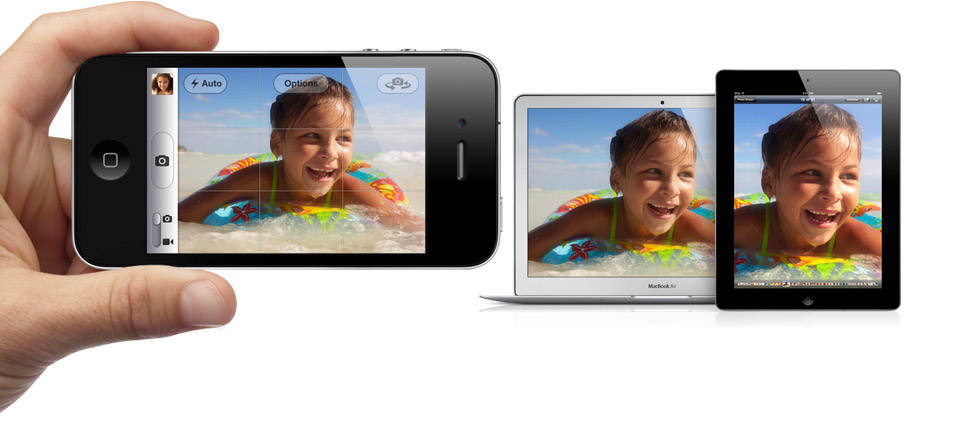
4: QuickPix (Camera- enhancing apps): This one truly hurts me. I have not touched the Apple Camera app for months. QuickPix is an awesome app by an awesome developer. However, the new camera loads faster than before, and has extra functionality not found in QuickPix, such as a hardware button (the volume button) and photo editing capabilities. As much as I loved you, bye bye QuickPix, hello new Camera.

5: Instapaper (Read later apps): This also falls under the category of “Will not die but will suffer greatly”. Instapaper or any other app that enables you to save articles on the Web for later consumption, is a product no longer needed with iOS 5. You see, the new Safari has a feature that enables you to add the web page you are currently viewing to the “Reader” section. Yep, Apple pretty much added its own Instapaper, although again, why not just buy the company? Bye bye Instapaper, hello new and improved Safari.
6: Twitpic (not an app): Well, this is to be expected. Twitter launched its own photo service, but that was all nice in theory until iOS 5 integrated it deep into the OS. Yes, now you take a photo with an iOS device and tweet it, can you guess which photo service iOS uses to host and share your photos? Nope, it aint Twitpic or any of the others, it is the Twitter photo service. Well, after all the hype about Twitpic owning my photos, I am happy to say, bye bye Twitpic, hello Twitter.
7: Remember the Milk (Reminder apps): I have to say, I tried many reminder apps, and somehow always ended up writing my items down in the Notes app. All the other apps just seemed like overkill to me. Now, Apple added Reminders to iOS, and from what I can tell, it is just what I need. I am sure some of the more advanced users will say Reminders is not enough for them, but I can safely say, I will be using Reminders on a daily basis. Bye bye, task management apps, hello Reminders.

8: Photoshop Express (Photo Editing apps): This was a great app for what it was. It provided basic editing functionality to spice up and modify your iPhone’s photos. Well, guess what Apple just added to the Camera app? Editing abilities. Again, it is not Photoshop, but it does the job better than any other mobile editing app I have seen. So, I can’t say I have really used you too often, but bye bye Photoshop Express, hello enhanced Camera app.
9: Echofon/Tweetdeck (Twitter apps): Over the years, I have done extensive testing of pretty much all Twitter apps for iOS. First of all, I can safely say, there is no great Twitter app for iPad. There are many good ones, like Echofon, Tweetdeck. Osfoora, Tweetings, and others, but none are the ultimate Twitter app. On iPhone, there are many solid options, but for me, Echofon was always the best. I think it is time to say goodbye to all these apps with iOS 5 coming with Twitter deeply integrated. Yes, you shoot a photo and tap Tweet, volla, tweeted. Let’s be honest, is anyone really going to bother opening up a 3rd party app anymore? Bye bye Twitter apps, hello iOS Twitter integration.
10: Instagram (Photo Sharing apps) First, let me just say, I love Instagram, always have from day one. It is not a revolutionary app that will make anyone say “Wow”, but it does the job and it does it well. It is in my opinion the ultimate proof that when it comes to apps, simplicity wins. However, with the new photo sharing capabilities, Instagram will suffer. It will not die, because after all, it is launching on Android soon (right, Kevin?). No, but seriously, it has more functionality than what is included in iOS 5 such as filters and more sharing options than just Twitter. Having said that, something tells me most Instagramers use the app to share to Twitter and that is going to stop with the native Twitter integration in iOS 5. Putting Instagram aside, bye bye to the majority of photo sharing apps, hello iOS Twitter integration.

11: Pulse (Reader apps): I am a huge fan of Pulse, Flyscreen, Flipboard, Flud, and many other reader apps, but they are all in trouble. The new Safari has a Reader section that essentially takes the Web page you are viewing and turns it into a page of a magazine. No mess and no hassle. Why open another app when I can have a reader experience directly in Safari? Now, let’s calm down a bit here. Flipboard is not dead, far from it. The experience is unparalleled and is not the same as the Reader in Safari. Having said that, I am sure these apps, every single one of them, will see a significant decrease in traffic on iOS devices. Some of them, like Flyscreen and Pulse are available on other platforms. Others are not. So, I guess this is not goodbye, but good luck to Pulse, Flipboard, Flyscreen, and the rest of the crowded reader app arena.
12: iChromy (Browsers): I have been using iChromy on iPad since I first discovered it. Why? The tabbed browsing is fantastic. Same is true for many other browsers that offer tabbed browsing similar to the desktop experience. They are all dead! Safari has a lot of new features, but the new tab functionality looks amazing, and will surely return the throne of best mobile browser to Safari, its rightful owner. Bye bye, tabbed iOS browsers, hello Safari 2.0.
13: Wifi Photo (Wifi syncing apps): So many apps have been developed to overcome the challenge of wirelessly syncing the photos you take with your iPhone with your computer. Wifi Photo is my favorite. They can all be eulogized today. With iCloud, your photos are synced automatically to the cloud and available for download from any device. Apple did not only make these wireless syncing apps obsolete, it actually beat them at their own game. iCloud if it works as advertised, will be the ultimate wireless syncing solution for iOS devices. Bye bye photo syncing apps, hello iCloud.
14: Dictionary (Translation apps): OK, iOS has a new dictionary option built in. Nothing else to say here. No more need for translation apps, with WordLens being the only exception I can think of. So, bye bye dictionary apps, hello iOS 5.
15: Gmail (Web app): I hate the Web app on my iPhone, there, I said it. I use Gmail on the Web regularly, whether it is for a better search, better organization of messages, or other features lacking in the Apple native Mail app. No more! The new Mail has better threading, better search, a better design, and a whole list of new features, such as the ability to flag messages and write in rich text formatting. I have not tried it yet, but something tells me I will not be needing Google’s Gmail Web app any more. Bye bye Gmail on the Web, hello new Mail app on iOS 5, happy to have you.
16: Find my iPhone: Well this is a no brainer, Apple added this to the iOS registration process. See TheNextWeb’s first look at iOS 5 and notice the screen to enable Find My iPhone functionality. OK, being as this was an app provided by Apple, I guess this is big deal, although it is yet another app I can now delete off my iPhone thanks to iOS 5. So, bye bye Find my iPhone app, hello new iOS feature.

17: iTunes!! Well I know I said I cannot choose one feature of iOS as the best, but if I had to, if you were really holding a gun to my head, well this would be my choice. For the first time ever, you can now own an iOS device, without a computer. No more need for iTunes and all that wasted syncing time. You can set up the device wirelessly, back up your files wirelessly, and sync your device wirelessly. This is huge. I have two words for you, Apple. Good riddance. And here are some more words I have been waiting to say for a long time. Bye bye iTunes, hello wireless syncing. I don’t know you yet but I think I love you!
That’s all folks, 17 apps I use regularly along with millions of other people, and will no longer have a place on my iOS devices. Some I am sad to see go, others less, but at the end of the day, Apple hit this one out of the park with iOS 5 and iCloud. No mention here of the new Lion features, and they are equally as awesome, but that is a topic for another time.
OK, Fanboys of Android, BlackBerry, and other mobile platforms that feel Apple stole their thunder, the stage is yours. Why did Apple completely fail with iOS 5, how did they copy other OSes, and how is every single point I made above, completely wrong and influenced by my love for Jobs and everything he does? The stage is yours…
Now if Steve Jobs would just admit HTML5 isn’t the be-all and start including Flash support, the iPad2 would replace most laptops and beat out every other tablet out there. All the other tablets support Flash.
Tom, you’re embarrassing yourself. Arguing that you are right about Flash and Steve Jobs is wrong is like arguing that dirigibles are the future and that airplanes will never cut it. Good luck living in the past.
But why do publishers still choose Flash when given the choice? The adverts on this page are flash. They have GIF alternatives, they could make HTML5 versions but thats a pain in the arse. Video players are always flash when the player is available. For games, Flash is far superior to lame HTML5 versions. If Flash was not needed and Jobs was right, why is there still lots of flash content? If Apple just let the player on the iPad then people/publishers could decide and we could stop having this stupid debate
Maybe Html5 is the future but Flash is the present. It’s true that it’s hard to find a web that uses flash as a core technology, but most of the websites that have videos use flash.
And it’s quite stupid to think it’s only about performance, put an option to disable flash and everybody is happy… well it seems there are some people in a place called Cupertino that are not happy about it.
@FalKirk … Fanboy much?
Flash? You mean the buggy POS that is once again the target of a 0-day attack?
No thanks. Flash support on Android was touted as a huge feature and the only thing that works on it is web adverts.
Flash on Mobile = huge failure. We don’t need it. Give up on it. “All other tablets support Flash” – gee, have you seen what they actually DO with it?
the iPad2 is beating out every other tablet out there
Flash?? I’ve used android devices that support flash and none of them work smoothly. Flash is garbage. Flash on the internet is mostly ads anyway. Every now and again I come across a video on a website using my ipad that requires flash…but that is very rare these days.
Good grief, give it a rest! The web has outgrown Flash. Let it die with whatever tiny amount of dignity Adobe has left it. This is an ex-parrot! it has ceased to be! it has joined the choir invisible!
Kudos to Apple for making all of those things features, but it sounds like a lot of idea theft, IMO. Though I doubt the makers of those apps have any recourse, since they’re probably signing the rights to their code away, as well as their firstborn child, as soon as they upload their app to Apple’s store.
Correct me if I’m wrong, but you’ll still need iTunes if you want to pull your content from your computer to your Apple TV. Also if you want to send music, for example, to an airport express device somewhere else in your house, correct? The only Apple TV thing I saw mentioned was Photostream integration. But streaming your personal videos and other items from your home computer will still require iTunes to be setup…although, iCloud certainly limits it’s usage.
Wait for it. I imagine full iCloud integration for the Apple TV is not far off. I rather expect an Apple TV 3 sometime close to Christmas of this year.
Unfortunately you are wrong on the Twitter front, the ‘deep’ integration is posting only, you still need to download Twitter.app to read your timelines and lists (ok they’ve made it available to download by tapping a button) but it isn’t all that integrated
Flash?! Hahaha. Go get a Xoom and enjoy that battery-life sucking experience.
I guess Steve should go back and admit that computers still need floppy drives, optical drives, removable batteries, wired syncing, et al.
I hate Android for usability purposes and love iOS but also hate Macs and OS X, but I bought a Xoom for testing purposes and it has some amazing battery life, so I don’t know what you’re talking about. I had it for 6 weeks and only charged it three times.
Agreed. It’s a horrible user experience, in my opinion.
Hillel, I am sorry but I’ll have to respectfully disagree with this provocative headline 🙂
Take the exemple of “reminders” (yes I am particularly interested in that one!). All Apple will do, is probably evangelize task management to more people, bring us more users who are looking for more advanced, and cross-platform services like RTM or Producteev.
They won’t kill us, if we know how to leverage this new “Reminders” app into our communication, then everyone will be just fine, and I believe, even stronger.
Remember, Apple is trying to build a closed environment, there will always be a market for openness.
Ilan, you know I respect your opinion and you are a whole lot smarter than me, but I think by now, most people realize that consumers prefer the “Closed” superior ecosystem of iOS to the “Open” and messy UX of other platforms. Anyway, time will tell about the reminders, in this case, you might be right… 🙂
I couldn’t agree more.
with all this new stuff comming i just have to say one thing, wow!
what amazed me the most is the fact that Lion and icloud were that cheap… i was expecting a higher price for these things
by the way my mother don’t own a computer and don’t know anything about computers either, the fact that now the ipad can work from the box and don’t need to use a computer, is a life saver for me because, i’m far away and can’t be there to make it work for the first time.
I wanted to buy her one because it’s easy enough to use for what she needs to do (surf the web, send email, watch pictures of her grandkids, etc…) now i can…
I only wish folks realized that since many of the apps “killed” are probably only going to be dead to hard core Apple users. There are still a lot of us who have a Mac but use other devices too that’ll still probably be using some of these apps for a while.
I can’t see how Find My iPhone has been eliminated… the client still allows you to find other people’s phones for them. That’s sort of a no-brainer to me.
Your logic for why Pulse and other reader apps are now defunct seems a little questionable to me as well–I use pulse more than anything else on my phone and iPad, and although I’m in the minority I’m sure, the new web browser doesn’t allow you to browse articles as easily as Pulse does. I’m still ecstatic about the new Safari, but only as far as it lets me maybe explore the web more effectively.
Instagram… I wonder about this myself. I know that when I started using it the filters were a main draw, but lately I only use it to post to Twitter and Facebook, honestly. That’s sad, and I truly hope Instagram can come up with something to keep me using their service in the meantime, but Twitter integration does seem to make Instagram a little less… shiny. :S
Instagr.am is not dead as a result of iOS 5. Way too many users now. It’s the Flickr of iPhone 4.
I support Flash too. I think Apple should support it on all their devices.
They should also allow browsers other than Safari on the iPad.
My first bye bye will be Things! It was expensive to purchase for 3 devices and then painful to sync. Dropbox created a lot of their own recent, negative publicity and I think Apple will be much more secure! Dropbox TOS misled and now iCloud can replace it.
I looked at all the 250 new Lion features and it looks like Instant Wipe of your hard drive is a new feature within FiileVault 2. I hope it works like Find my iPhone.
Revolutionary… you’ve got to be kidding me. Notifications, Twitter integration, etc. I’ve had these revolutionary ideas for over a year. I do wish Apple would have innovated a little bit so that Android keeps innovating. This competition is great for consumers.
I think its a shame that he took ideas of others & made them his own. He really should have purchased the comp. Or the apps. Hopefully it will show others (for it feels like greed) what their getting when dealing with Apple. And I do own both Android & Apple. Just feel he should have shared the wealth.
Thanks for the kind words about QuickPix and Two Teeth Tech! Not a huge shock I guess that they’d update their own camera app. The lock screen camera launch is awesome – if only they’d allow that to be configurable to launch your app of choice! I just downloaded iOS5, and I must say I was a little underwhelmed with the camera. They could have taken it so much further and made it so much more useful. The biggest surprise to me is that they are still using old 3.x era APIs which are painfully slow. Definitely poses some new challenges for camera replacement apps but I think they’ll need to take it quite a bit further before they’ll be displacing the rest of us entirely. We’ll keep working on it. Let me know when you’ve welcomed us back to your home screen 😉
Dude, instagram is a whole photo-sharing community, it’s about sharing and liking and sharing the love for cool pics. I’m not talking puppy pics or girls showing off themselves. Instagram wiill stay – unless something similar but much better comes along
I think you’re wrong on the Dropbox front. What I use it for is file storage/accesibility, the same I use iDisk for. I’ve never used it for music or photos, at least not in the “iCloud” sense (syncing to devices). Now that my iDisk will be disappearing, Dropbox will be more needed than ever. I think we’ll end up seeing Dropbox as the big winner with the disappearance of iDisk.
“No more need for translation apps…”
It’s actually ever so much more, but Pleco is sold as a dictionary and is utterly an awesome tool for Chinese.
Live OCR. Multi-clipboard. Awesome recognition of handwritten Chinese (and practice thereof). Pronunciation tools.
Apple is famous for implementing the core 90% of functionality (e.g., Reader, which I use many times daily and love even though it doesn’t have the bells & whistles that Readability did).
As you say, many of these apps will survive and even prosper as they get challenged to enhance their work, make “pro” versions for the heavy users who are willing to pay a buck or three for a finely-tuned version (just as I pay extra for Excel on my Mac versus a cheaper Numbers).
And as you DON’T say, it is utterly inevitable that as Apple advances its platform, they will do some things that other firms had an idea about first. Like InstaPaper’s developer, they recognize that ideas are not patentable and the cutting edge cuts, and moves on.
all this apps have a high rating on app store, now Apple based on it implementing there apps like iMessenger. If you get a good idea and create good app for iOS possible that Apple will create a copy ( copy cat ) of it in 6 mounts. We need from Apple something better faster new revolutions not copy BBM and whatsapp. I like apple and i have all apple products but this is stupid article or bad interpretation !
I’m hoping that the new OS has separate notification for separate email accounts. I find it annoying that you can’t separate the notifications for business email and personal email on an iPhone or iPad the way you can on a Blackberry.
Thanks for the good post Hillel. I use 90% of the apps that you mentioned, and wanted to point out one thing about the camera comment. I use QuickPix almost exclusively as you do, and it has one feature I have yet to see from other cameras… While shooting video, you can also take pictures (without stopping the video). Capturing video and photos simultaneously is the reason it will probably stay on my devices.
Good to know, thanks.
It would Be good to have the capability to change the lock screen camera app to something else as I Use Qbro much more now.
Another thing they could do is make a “quick-touch” feature allowing you to reach your favorite and most used apps from the lock screen… But all in all I can’t wait for iOS5
I love how you include PS Express and Instagram to the list. In no way, shape or form will people stop using these because of the “integrated photo editing” in iOS 5. Same with the integrated Twitter. Yes, you can now share photos on Twitter, but Instagram is much more than that. For instance all the Instagram groups that meet up monthly. Now, I’m sure you’ve included these two on the list as you apps that you’ll personally stop using…but for the majority of the people, myself included, we’ll still be using these apps on a day to day basis.
I think Boxcar will become more useful with iOS5 – not redundant.
Sure, Notification center replicates the ‘inbox of updates’ that Boxcar has – but Boxcar has much better functionality, including the ability to create a solid stream of information that’s relevant to me -twitter updates, very important emails, RSS feed updates etc.
Having that information pushed to the Notification center is great – but when I clear it from Notification center, Boxcar will still keep hold of it. So, Notification center becomes the place I can go to check for updates, Boxcar becomes a sort of social inbox, collating data together for me to read and review at my leisure, even if I don’t have that information cluttering up notification center.
Sounds to me like Apple learned a think or two from Microsoft (for once)… it is often cheaper to copy a great idea than to acquire it.