
By: Hillel Fuld
A few days ago I was fortunate enough to receive a nice surprise from Nokia, their flagship Maemo mobile device, the Nokia N900. To be honest, I had lowered my expectations for the device as a result of a friend’s opinion, who told me I was not going to like the phone. Before I get into details about the phone with all its shortcomings and industry-leading features and specifications, let me just state in one sentence that overall I am extremely pleased with the device and pleasantly surprised by its endless capabilities.

My first impressions of the N900 as soon as I unboxed (who made up that word anyway?) it was “Oh man, this thing is bigger than I thought”. The phone is 18mm thick, which compared to the iPhone’s 12.3mm is pretty darn thick. In terms of its height and width, it is smaller than the iPhone, but still bigger than the average phone on the market. As soon as I powered up the device, my reservations about its size were forgotten. Upon seeing the nice Nokia introduction, I was immediately extremely impressed with the phone’s screen, which compared to a Bold and an iPhone seemed a whole lot clearer and more vibrant to me.
As soon as the phone is completely up and running, the OS presents you with a nice intro and small lesson on how to use the phone. This phone is so cool that even setting the time was an experience like no other. However, and this is a huge disadvantage, the difference between the Nokia’s resistive touch screen and the iPhone or Nexus‘ capacitive screens was felt immediately and in a huge way. The one thing that leaves me scratching my head about this phone is why Nokia would not use a capacitive touch screen in such a ground breaking device. Just a small explanation; resistive screens are kinda last generation and were originally engineered to work with a stylus and not a finger, whereas a capacitive screen like the one on the iPhone and most Android devices are meant to work with fingers. Having said that, the N900’s resistive touch screen is almost completely finger compatible since the Maemo icons are large and easy to press. In the last three days, I think I have taken out the stylus maybe twice.

At this point, let me just clarify that the reason I chose to compare this device to the iPhone is that there is no denying the iPhone’s popularity and the widespread opinion that it is in fact the most advanced mobile platform on the planet. I could not help but think “How does this feature compare to the iPhone?” every time I discovered something new or missing on the N900. So, putting the Android/iPhone/BlackBerry debate aside, I chose to compare the N900 to Apple’s mobile device. Having said that, it should be emphasized that the two phones are extremely different in their specifications, philosophies, and user bases.
So before I talk about how the N900 ups the iPhone, let me just list a few examples of things the iPhone has that the N900 is missing. For starters, the size, as mentioned above, is a huge factor. After all, you are going to be carrying this device around, and the N900 might save you a few trips to the gym it is so heavy, but at least it will get you into shape, right? Moving along, the screens cannot be compared. I liked the iPhone’s screen and its responsive nature better than the Nexus’, but the N900’s resistive screen does not even compete with the Nexus in this department. I found myself pressing on icons multiple times on multiple occasions.

Another thing some people might say the iPhone has over the N900 is its interface, which is polished and intuitive, but I have to disagree. I do not disagree about the iPhone’s UI, but rather with the claim that the N900 or more accurately the Maemo 5 UI is “half baked”. I think it all comes down to the kind of user who would be utilizing the UI and an N900 user wants a powerful multi tasking beast of a phone, which is precisely what the interface provides. Perhaps, the addition of a single hardware Home button would have been a blessed initiative, but as a whole I get the concept of Maemo and how one is supposed to use it. Was it as short of a learning curve as the first time I used an iPhone? No it wasn’t, but after a few hours, I was flying through the phone like I had been using it for years. It takes some time getting used to and a small shift in the way we have used mobile interfaces, but once you get a hang of it, the possibilities are endless.

So, now for the meat of this article. The N900 is truly everything the iPhone is not. What do I mean? Well, at the end of the day, I, and many millions of people like me, do not use an iPhone. I find that for the way I use my mobile device, the iPhone wouldn’t be able to keep up. So where do I start? Here is a list of ten things the N900 and the Maemo OS do incredibly well and are sadly missing from the iPhone OS.
- Text Input: I know this is a heated topic and there are many iPhone users (or should I call them fanboys?) who will swear to you that they type faster on the iPhone with its virtual keyboard and corrective software than any BlackBerry or other QWERTY device. I agree that the iPhone has done virtually everything it can do to make typing on a screen possible and plausible, but at the end of the day, two choices are better than one. The N900 has an incredible virtual keyboard, one that I might go as far as to say is as good if not better than the iPhone’s. The corrective software is not as good, but the layout is great and the letters are gigantic. Not a fan of the virtual keyboards? No problem, just slide out the N900’s beautifully built QWERTY hardware keyboard. The hardware keyboard only has three rows, which I thought would make it difficult to type on, but I could not have been more wrong, and I can safely say it is the closest keyboard to my BlackBerry Bold I have come across in terms of comfort and convenience.
- Storage: When it comes to data storage on the two phones, neither one is too shabby. However, there is one primary difference between the N900 and the iPhone when it comes to storage. This is such a basic difference that it actually applies across the board and can be said to be the main difference between the two platforms and the thought process behind them. I am referring to flexibility. With the iPhone, you get what it comes with, which is either 16 or 32 GBs of on board storage. No expanding possible, whereas the N900 comes with 32GB and has a MicroSD slot, which means you can add another 16GB, and very soon 32GB of storage. Besides the numbers advantage that the N900 supports 48GB of storage, while the iPhone only 32GB, the N900 gives you the freedom to decide, unlike the iPhone… Which leads me to my next point.

- Battery: This is one of the biggest complaints people have about the iPhone, the inability to replace the battery. Let’s be honest here, with the exception of one or two smartphones I can think of, no mobile phone has a battery life of more than a single day of heavy use. They don’t make em like they used to with the Nokia phones that had to be charged once a week. Well to be more accurate, it is not the phone that has changed, it is the way we use it. With all the advanced features incorporated in modern smartphones, and their continuous connection to the Web, you cannot expect them to last more than a day. So with the iPhone, you are stuck with a dead phone, while the N900 allows you to pop out the battery and replace it with a fully charged one. This is of course a huge advantage, and I have not even addressed the issue of the battery’s end of life and the need to have Apple replace your iPhone’s battery…
- Web Browsing: This is where the N900 truly shines. You think the iPhone’s browser shows you the Web like it is supposed to be seen? You think the iPhone’s surfing capabilities are the closest to a computer’s on a mobile device? You aint seen nothin yet. The N900’s built in browser is absolutely phenomenal, and is not close to a computer when it comes to the way you view the Web, it is identical. You surf the Web on the N900 the same way you would on a computer with the addition of double click zooming of course. The browser is fast, accurate, and renders perfectly, something I could not say for the iPhone’s browser. I do not mean to sound too harsh, the iPhone has a revolutionary browser, or at least it did when it was announced, and compared to let’s say the BlackBerry browser, is another world. However, the N900’s browser? Well, I would say it is to the iPhone browser what the iPhone browser is to the BlackBerry browser? Confused? Bottom line is, it is by far the best mobile browser on the planet. Oh, did I mention is has Flash? The N900 has browsing capabilities that are unprecedented, and don’t even get me started on Firefox on the N900, which includes extensions and many other awesome features.

- Video: Back to the flexibility and openness issue of the mobile OS, the N900, unlike the iPhone can play any type of video. Well almost… Watching a video on the N900 is like nothing else I have ever seen. My wife summed it up pretty well when I showed her a video on the N900 and she said she feels like she is looking at a real object that she can touch. It is that good. It plays WMV/RealVideo/MP4/AVI/XviD/DivX files, and from my experience, it plays them smoothly without any choppiness. There is also the issue of transferring the files onto the phone, which in the case of the N900, like many other phones, is a simple drag and drop process, something sorely missing from the iPhone’s capabilities.
- Video Conferencing: Not much to say here. .. The N900 has a secondary VGA front facing camera to enable video calling. I have not tried it out, besides a mirror app that I downloaded, which uses the front camera to show you your own reflection, but the mere existence of the second camera leaves the iPhone way behind.

- Multitasking: OK Apple, here is where you go down! The N900 is an absolute monster when it comes to running more than one app at a time. In fact, we are not talking two, three, or even four apps at a time, which is what a jailbroken iPhone is capable of. I believe the record of most apps running simultaneously on the N900 stands on 30 (watch the video below to see its multitasking in action). For me, this is a no brainer, and multi tasking is by far the biggest problem with the iPhone OS, not to mention probably the main reason I do not use an iPhone and will not get an iPad. While the iPhone falls behind almost all smartphones on the market such as BlackBerrys and even Windows Mobile devices, the N900 significantly raised the bar when it comes to multi tasking. This is actually very interesting since the two devices have the same exact ARM Cortex A8 600 MHz processor. Having said that, to be completely honest, while the N900 can do so many things at once, even with only one app running, it is still not as zippy as the iPhone, but that might also be a result of the last generation screen and its lack of responsiveness.
- Camera: While the iPhone’s 3.2 megapixel auto focus camera is a significant improvement over the last generation iPhone, there really is no comparing the N900 camera to that on the iPhone. Not only is it 5 megapixels, but it has one of the world’s most advanced lenses, the Carl Zeiss Optics, as well as not one flash (which the iPhone doesn’t even have), but a dual LED flash, which in my tests resulted in extremely high quality photos even in low light conditions. While the iPhone’s pictures are usable and OK, the N900 can easily replace your standalone point and shoot camera.

- Bluetooth: This is a pretty basic but crucial point. While the iPhone supports Bluetooth and even A2DP, it has headset support only. The N900 has full Bluetooth capabilities including headset, file transfer, and even contacts syncing from any other phone, which turned out to be extremely helpful when it was time to add my contacts to my N900.
- VOIP Integration: While Apple is busy rejecting apps like Google Voice and making noise over allowing Skype calls over 3G, the N900 has complete VOIP integration. This was definitely one of the coolest parts of the N900 experience. When you select a contact from the phone book, you can call them on Skype, Gtalk, as well as many other IP services, straight from the phonebook without the need to download a 3rd party client. The voice quality when calling via Skype on the N900 blew me away, and neither I nor the person I was calling could believe I was calling from a mobile phone. The N900 integrates your various IM network contacts such as Gtalk straight into your address book, which enables you to see when they are online and contact them there. Just like the N900’s storage, Web browsing, and multitasking capabilities, I think this device leads the market when it comes to VOIP integration.


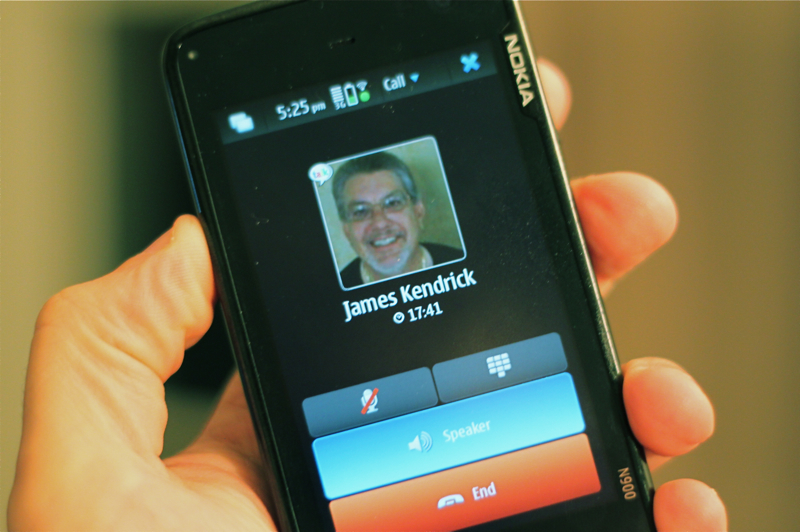


In conclusion, I will say that I am extremely impressed with the N900 on almost all fronts and I truly believe that Meamo should be the future of Nokia devices. I must emphasize though, that it is not a device for everyone due to its size and somewhat complex interface. Let’s just sum it up by saying that compared to Symbian, this phone is a revolution, and if Nokia takes this size step ahead with Maemo 6, the next iPhone better step up its game if Apple wants to even compete. Nokia, some people in the US might not know, is still the number one manufacturer in the world, and for a while there, I did not understand why or how they reached that level, but with the N900 and its endless potential, it all becomes very clear again that Nokia is here to stay for the long run.
Thanks Hillel. Maybe Nokia will send me one for Chanuka..
This is a very thorough review. I’m staring at my iphone right now with the question: ‘Why can’t you do that?’ Great job!
Looks great but I’m waiting until they bring a low calorie version of it out later in the year.
Nice. I’ll keep my multitasking Palm Pre, thank you. But good to see lots of smartphones picking up the pace.
Great review, though the Multitasking section is a bit inaccurate. The Palm Pre Plus still has the lead in number of simultaneous applications at 50. See here –
http://www.engadget.com/2010/01/21/palm-pre-plus-shows-off-multitasking-upgrade-with-50-simultaneou/
Still, it’s awesome to see competition in the smartphone arena. The N900 sounds like a great device!
How is it compared to the Nexus One?
Thanks for all the feedback, appreciate it. As for the Nexus comparison, both are VERY impressive phones, but for me, the Nexus’ slim form factor, Snapdragon processor, and relatively developed App Market still gives it the edge…
If only it were available in Canada. Wind mobile can’t open stores fast enough (they are rumoured to be carrying to N900.) alas I will remain patient for this amazing mobile computer (Nokia does not refer to it as a phone, rather a mobile PC with phone capabilities). Great article and accurate review and comparison. One theory: capacitive screens don’t work with gloves and Finland has a long cold winter like Canada, Cupertino does not)
Hi, one of the things I heard in the pre-release media was that the GPS capabilities are state-of-the-art and far surpass the iPhone. Any opinion? Thanks.
But it hardly has any apps.
That is sad.
With multitasking, you have to carry around several batteries.
With the iPhone, it is easy to also carry external batteries with it to run it longer.
H…..this makes me wanna try it!!!
@shellykramer
How much will it cost?
How many apps?
Does it intergrate was well as my iPhone does with iTunes?
When can I buy one?
Can I download 1000s of videos, podcast, audio books, movies, etc.. like I can with my iPhone?
And finally, if Nokia’s so innovative, after the fact, how come they’re suing Apple as a means of trying to force them to cross-license their own IP for Nokia’s use?????
The difference between Nokia and Apple products is one is run by a bunch of engineers and the other by artist, creators and engineers- you guess which is which.
I’m sorry, did you call iPhone fan ‘fanboys’?? After writing this ‘flaming Nokia fanboy’ article? Seriously??
OK, I’d buy it. I’m sure it would meet my mobile needs very nicely. I, and I believe most users, don’t need thousands of apps (anymore than I and most PC owners don’t use thousands of apps). But why must Nokia have its own operating system? Why not just use Android? Anybody want to answer that one?
apps… big point for a smartphone to survive on the market. the n900 now has somewath over 1000 apps. but it’s also posible to run apps not desinged for it, but for linux 😉 and: its a new platform, so wait one year and you’ll get many apps. the iphone did”‘t start with it’ 100.000 apps, they all came later. so site back and wait. during this time the great apps allready avelable will shorten you the time.
N900 is so great. i love it. i’ve turnd on my laptop only 2-3 times since i got my N900, cuz it’s a little computer and no smartphone 😉
Pretty impressive gadget! Cost?
Try comparing “apples with apples”: say the N900 (price point in Europe north of 500 Euros or $700 and almost no subsidies, virtually no apps so far, and a complex UI for the geeky user) and maybe the HTC HD2 (so that we get a sense of Maemo vs. Windows Phone 6.5.x. and maybe 7 later next month), and finally with the next version of the iPhone and not the one released last year. Nokia and all the industry had almost a year to figure out how to catch up on Apple smart phone wildfire!
Thought you were an Android fan last week. Seems you have already switched to Nokia. What’s gonna be next ?
“How much will it cost?”
I paid $520.
“How many apps?”
A few now, growing every day. I expect exponential growth over the next few months due to the extreme ease of development.
“Does it intergrate was well as my iPhone does with iTunes?”
Why would one use iTunes with a non-Apple product? It is the single most half-baked, buggy piece of software I’ve ever had the displeasure of using. iTunes has hung every system I’ve ever used it on. Genius is utterly useless. It doesn’t play FLAC out of the box. Use Media Monkey or some other useful program instead of the woefully incomplete iTunes.
“When can I buy one?”
When your mother gives you your weekly allowance.
“Can I download 1000s of videos, podcast, audio books, movies, etc.. like I can with my iPhone?”
Um… of course. And then some.
“And finally, if Nokia’s so innovative, after the fact, how come they’re suing Apple as a means of trying to force them to cross-license their own IP for Nokia’s use?????
The difference between Nokia and Apple products is one is run by a bunch of engineers and the other by artist, creators and engineers- you guess which is which.”
I assume this is either utter stupidity or sarcasm. In either case, not worthy of response.
At this point, Android has nothing on Maemo. Android is simply too inefficient as it currently operates.
And as for price, the total cost per year of the N900 is significantly less than the iPhone. In my region, with the Nokia on T-Mobile vs. the iPhone on AT&T, we’re talking about a difference of a few hundred dollars.
Just out of curiousity, how do the full sites look on a mobile device? I always found that surfing non-mobile sites on small screens was a bit of a drag.
Very useful review ! You knew how to handle the comparison objectivelly, and that[s great pal !
It’s hard to decide which phone to use. Unfortunatelly it is hard to get the latest gadgets here in Brazil, But keep up with you cool comments!
While I agree with most of your points, I disagree with you on a number of things.
1. You may say it is thick, but I wouldn’t imagine it thinner. It makes holding it comfortable. But that is just my opinion. And the weight? You get used to it in an hour. After I got my N900, I thought the same thing: Woah it is so big and heavy. After using it for an hour non-stop, I didn’t feel it heavy at all. The thickness thing may be noticeable (5.7mm is a lot (although I prefer it than my brother’s iphone)) but the weight? Seriously..50 grams won’t do much difference. And just to clarify..you would still need to go to the gym :).
2. Touch screen responsiveness. Well..I find it pretty responsive. You just need to add a little more pressure. It is a very good resistive touchscreen. Almost no pressure is needed to operate. I found it very good and I only use stylus in the web, because I don’t zoom much and links are kinda small. The N900 has an 800×480 resolution, so text stays clear even if you don’t zoom in (if you have good eyes).
About resistive vs capactive? Capactive provides only ONE advantage. Easier to operate. Resistive provides a number of advantages. It can be used with nails, gloves or anything you want. It can be used with a stylus, so that you can actually draw on the device. I find it quite fun to draw on it. The only thing lacking is handwriting recognition which Symbian has..but maybe with updates.
3. Why on earth do you people hate Symbian? I had an N95 8GB before this N900. And it was a wonderful phone. When my brother got his iPhone 3GS he couldn’t keep up with what the N95 did, except for games. Developers tend to develop the good games only for the iphone..which is beyond me to be honest. Games with no tactile feedback..it is ridiculous. The web browser on Symbian is far better than any other (except for the MicroB of course). It supports flash to an extent, javascript, silverlight etc..
I just don’t get it. Before saying Symbian is slow..have you even tried using one? Sure apps don’t load as fast as on the iphone..but on the other hand it supports multitasking.
Nokia N900 also bags the Best Travel Gadget AWARD – by Travel and Leisure T+L 2010 Design Awards.
http://tinyurl.com/BestTravelGadget
App lovers and supports are missing a vital piece of information: Apple designs their devices around the business model of *forcing* you to make additional purchases for your device. Look at the iPhone or an iPod – You have to buy music or apps through THEIR service to put on YOUR device. Hence why the iPhone, which is NOT I repeat NOT a smart phone, has been made into the dumbest phone on the planet because “out of the box” it can’t even do more than my three year old N82. The iPhone *needs* apps to be functional, without it is basically useless.
A true smart phone or mobile device is a stand alone product that needs little to be useful, with apps only adding to its feature set, not completing it.
I love my N900, I am upset with Nokia that they cannot do what Apple has perfected over the years; polishing a device and making it the best UI or experience around. If Nokia could do that and keep their open and forward thinking, ignoring the stupid short-sighted people here in America, they could be doing a lot better for themselves.
Thanks for the comprehensive review. I was wondering about the differences between the iPhone and the N900 – good timing! My son bought an N900 a couple of months back and he’s enjoying every minute. Looks likely to be my next phone too.
my last phone was a £10 job so I dont see why everyone is complaining about its thickness, its hardly what i’d call chunky! it needs that slight thickness to store its keyboard anyway.. im not so keen on ultra thin efforts. a bit retro for me, then. my last phone was a £10 effort so perhaps im not the best for review, but it is a good phone, excellent for browsing online and watching movies, radio etc on. my only complaint is that its screen could be (arguably) slightly bigger, and its missing an fm radio (athough thats downloadable, and it does have internet radio anyway). my biggest problem at the moment is that networks which require you to use symbols to check your balance may not work yet, and if the phone is off, u may not receive messages at all (both of these are primarily vodafone issues which need to be solved FAST). thanks
resistive screens are NOT last generation. they are far better for precision, which is very handy for such a high res screen. have you ever had trouble hitting a button on iphone or accidently hitting some other button next to it, because you only have the choice of using a huge finger? you can use our finger, finger nail, stylus (in respective order of precision) on n900. As always nokia made the right decision for its users not just the fashionable one…ifags
vs. android: n900 is underclocked for battery life and heat by default. you can ‘overclock’ with same if not better battery life (due to simultaneous underclock when idle) and slightly warmer by installing an overclock patch (on n900, hacks are made to order).
n900 is the informed and intelligent user’s dream machine. stick with ur over-marketed, overpriced ifascist and and-fag-droid, you predictable mindless bandwagon b*tches
I will say Fuld’s review is pretty true. But how one perceives has to relate with his situation back and forth.
I was fortunate to read this when searching the way to input 2nd language (MSCIM) which bug.
At the age iphone’s launching has actually added pleasure to general public user by advanced functionality (at the time) , plus what everyone adictted to STYLE.
To me, iphone is a luxury mirror if I can’t go to restroom, since I am tech type and not interested to movie-music-game-chat. Once saw the browsing, I have never bother to know.
I never used anything before and I though netbook or ipad will be my destiny until I read this review with N900 on hand. Blackberry seems acceptable for office work but personal requires more.
N900 come to me as a gift and not for return. I start playing it. Starting is difficult (everything is) to me eventhough display & sound is not bad. Something however starts in my heart, calm, or comfort, or peace because ‘what I hate’ to see is not showing. First thing I try is browsing with WiFi and expecting crab pages and crash…. You know the story then. N900 can replace PC to surf.
So, I end up writing response here. Even the bug is not yet solved, I am happy a digital tool can give reasonable purpose to me.
Multitask, I mean not repeating same job. Reality is different type of things happening. So, I google info, youtube songs mv, yahoo local news, yahoo webmail & attaching, bluetooth file, checking update, install, config’n setting, photographing.
… and ,for someone, to fackbook, twitter
Finally, may be system cache is clean, it has not crashed so far.
Pls try not use it as phone but a replacement of internet PC. Then it will be a handy pocket digital on wearing. Keep the battery and style to a wider choice of handphone
Today, during a seminar, the instructor is talking about measurement. He suggest we can try ourselves by using a free download tools for iPhone. Instantly, I saw the next chair who started flipping icon pages of her iPhone then typing in wording to search. Pops out installation command. Although failed twice, third attempt completed installation at last. It’s only a minute or 2 by her skillful finger. Vola! nice and fast meter is there ! reading live measurement
App is where value shines. Not mind for free
This phone will never sell. Period.
n900 can run android
really it works for me
try searching about it on youtube.