
By: @Hilzfuld
All this talk about the Nexus One and the Droid has had two effects on me. For starters, after playing with the Nexus One, I am now 100% convinced that I want one. The phone is extremely impressive both in terms of its hardware and software. It is surprisingly thin and the screen is gigantic, relatively speaking. The entire phone is made out of some sort of rubberized material I have not seen before. In terms of the processor, the Nexus responds extremely fast, way faster than any other phone I have used, but then again, I have never used a Snapdragon device.
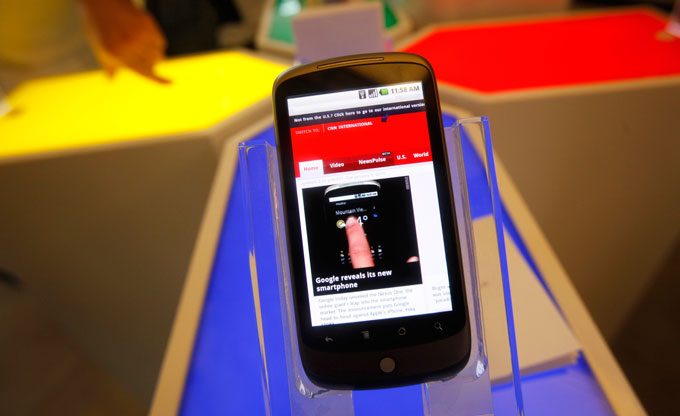
The software though is what convinced me that the Nexus One is worthy of all its hype. I have been using Android 1.5 on a Samsung Galaxy, and the phone’s 528mhz processor just prevents you from getting the full Android experience. After playing with the Nexus, I can safely say that Android is the future of mobile phones.
Besides leading me to the conclusion that I want a Nexus One, the other effect all the buzz had on me, was a curiosity to better understand the potential of Android as an open OS. Like I said, I have been using the Galaxy for a few months now, but not as my primary phone, due to a few disadvantages of the phone, the primary one being the relatively slow processor. However, after playing with the Nexus One, I decided to try and get to know my Galaxy a little better and to attempt and take full advantage of its open capabilities.
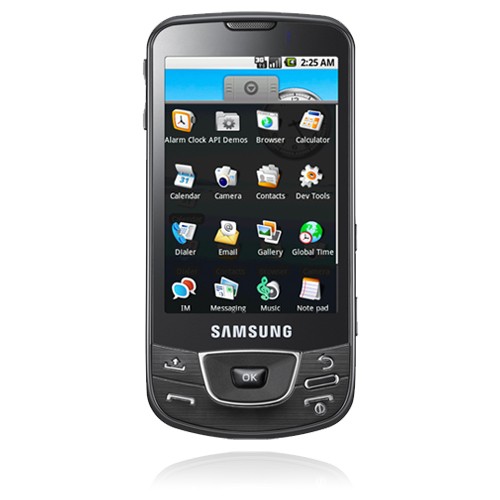
So, I started to customize the Galaxy in a way you can only do on an open platform, and sure enough, I fell in love with the OS. I am still not throwing away my Bold since I need the push mail and the Galaxy has some funny problems like a lack of lights on the hardware buttons, making it impossible to use at night.
Having said that, I am much more impressed with the Android platform and the Galaxy then I was a month ago, so I thought I would share the potential I recently discovered and how I did that.
So, let me start by saying that if you have been using Android and you have gotten to know the OS well, I am sure most of what I am going to say here will seem obvious to you, but it wasn’t to me.
First of all, one of my biggest complaints from day one of using Android was the keyboard. Comparing it to the keyboard on the iPod Touch, which is the only virtual keyboard I had ever used, left me very frustrated. I found the keyboard difficult to use, and I was unable to write a single sentence without errors.
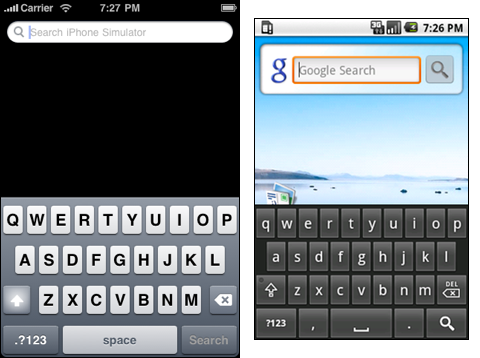
I was, however, stuck in the mindset that a phone has one keyboard, and I would have to get used to it. I have Apple to blame for that Jail like mentality, so thanks a lot Steve. With Android, this is very much not the case, and when you are typing something on the phone, whether it is an email or a text message, a simple long press on the input field enables you to switch keyboards. Turns out my provider preinstalled a multi language keyboard on the Galaxy that was bundled with major issues, crashes, and a lack of proper corrective software. Once I switched to the default Android keyboard, life was a whole lot better, but still not as good as it was about to get.
As soon as I found that I can easily change the input method, I figured there has to be a downloadable keyboard that will one up the Android keyboard, and no surprises there, I was right. The name of the app is “Better Keyboard” and despite the lack of creativity is its name, that is exactly what it is, a better keyboard. Searching the Android Market for the words “better keyboard” will show you just how customizable this app is. There are approximately five hundred different skins for Better Keyboard, and each one makes the keyboard appear differently in terms of its size, color, and shape. I can’t help but think how this would never fly on the iPhone.
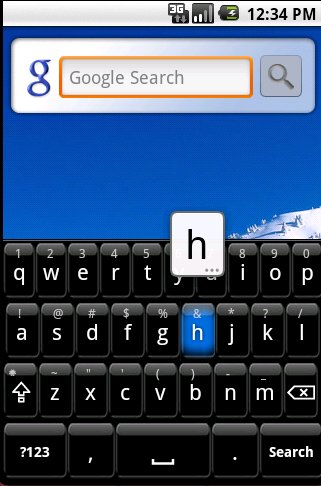
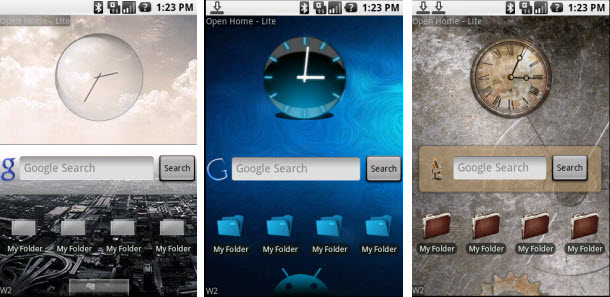
So my biggest issue was now solved and I was typing just as fast as I would on the iPod Touch if not faster. I was then curious to see what other fundamental features of the phone can be changed using a 3rd party app, and I quickly realized that there was almost nothing that could NOT be changed. I downloaded an app called Open Home, and this app really helped me realize what an open OS means. Forget the keyboard, Open Home provides an entirely new look to your home screen.
Android allows three home screens by default, which might not be enough for users that like to have all their apps on their home screen. With Open Home, you can have seven home screens, now we’re talking. However, that is not it. Open Home, similarly to Better Keyboard comes with hundreds of skins from which to choose. You can make your device’s home screens look like anything you want including any the other popular mobile device. Open Home lets you fully change the look and feel of your Android device, and I mean fully. The one issue I have with Open Home and the reason I am not using it exclusively on my phone (I switch between the default Android home and Open Home) is because there are no available widgets in the Market yet that are compatible with Open Home.
This leads me to my next point, widgets. Forget everything you knew about mobile phones and their settings. Forget having to go into Settings to make the screen brighter, turn on Bluetooth, see the status of your battery, or anything else you would do on your Settings screen. It is all available as a widget in the App Market. That means that pretty much any functionality you would need from your mobile phone is available with one press. You know how Apple’s main iPhone campaign is “There’s an app for that too”? Android’s should be “There’s a widget for that too”. Anything you can imagine is available in widget form.
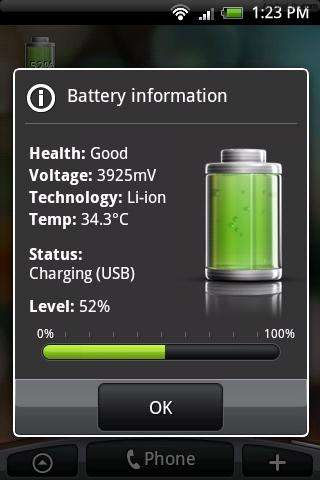
My first home screen (not in Open Home) is full of widgets. I have a widget to turn the phone on silent and then back to loud in one press, I have a widget to enable and disable Bluetooth, adjust the screen’s brightness, turn on/off the Wifi, a post-it widget to quickly add any notes to myself on the home screen, a voice recorder widget, a volume widget, a battery status widget, and others. I think you get the point. Anything I would usually have to open the settings to adjust is available on one home screen.
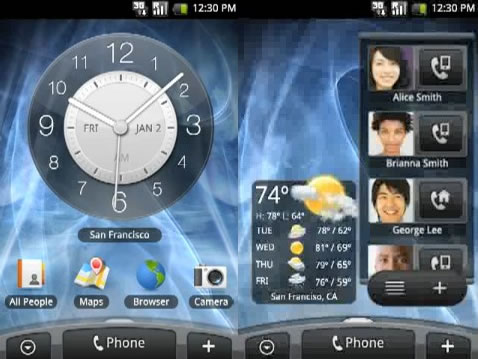
Other widgets I have include Facebook, TuneWiki, Twitter, and many more. One more widget that deserves a mention is a picture frame widget. I have one on each home screen, which works out well since there are only three home screens allowed and I have three kids. Each home screen has a nice picture frame in the corner with one of my kids. It is the perfect size, not taking up too much room on the screen, but big enough to see the face clearly. The size, however, is also customizable. So that is one major advantage to the Android platform, fully customizable home screen widgets.
Moving along, there are of course home screen shortcuts too. I have forgotten what it means to dial someone’s number or even look for them in my contacts. You can add a shortcut to any contact as an icon on your home screen, and with one press, call or SMS them. You can also add shortcuts to web pages, which will open up the URL with, you guessed it, one press. Using shortcuts combined with widgets, I am not sure I would ever have to leave my home screen to do anything on an Android phone.
Then there are of course apps. You can easily drag any app to any location on one of your three (in the default configuration) or seven (using Open Home) home screens. The problem is, three home screens is just not enough for all the apps I would like to add especially given the large number of widgets and shortcuts I already added. Well, there’s a widget for that too.
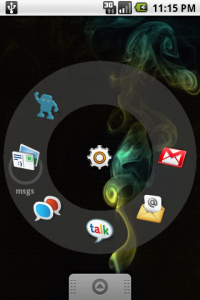
I found a widget called Launcher Dock, which enables you to select seven apps, contacts, URLs, or whatever else you want to add, and include them in a dock that appears as an icon on your home screen. The dock is fully customizable including changing the fonts color, the way the dock appears and responds to your touch, as well as whether it provides haptic feedback when you press one of the shortcuts in the dock. So, now you have all the apps, widgets, and shortcuts on your home screen, plus an additional seven that can be accessed with Launcher Dock.
Other Android defaults I changed include the browser, which I replaced with an app called Dolphin Browser that provides a new level of browsing the Web. I also changed the SMS interface and how the phone notifies me of an incoming message. This was done using an app called SMS Popup, not a very creative name, but an amazing app.
I could really go on about the different things I did to customize the Galaxy and make it my own, but I think you get the drift. The bottom line is, all the comparisons across the Web between the iPhone OS and Android are in my opinion, ridiculous. While the iPhone OS is “What you see is what you get”, the Android platform is just a platform, and can be completely 100% customized to your needs. There really is no comparing the two.
I am going to continue to use the Galaxy and see what other tricks I discover, but all this Android playing just strengthens initial decision that I gotta get me one of those Nexus One devices. You hear that Google? I am at @hilzfuld if you need my address for shipping.
I second this .. I am using a stone aged phone.. but I’ve been playing around with iPhone and others.. I like to keep my niche.. so I will get something other than iPhone.. Great writeup!
Thanks so much Ruhani, great to get a comment from one of my all time favorite people on Twitter…
Ah, seems like just yesterday I was suggesting your first apps. And now look at you, all grown up and bloging about Android… time goes so fast… 🙂
Good work man, informative, easy to read, I like it! Next step is rooting your phone cause…you haven’t seen anything yet!
Keep up the good work.
Um, sorry for the question, but do I know you? Seriously, who are you? 🙂
Did you mention that the Android has only 256 MB for Apps? The iPhone has up to 16 GIGABYTES. A single iPhone app can be 2 gigs or more, completely overwhelming what can be done on the Android. But then, you may not need a selection of 140,000+ apps to play with like iPhone users have.
I get it – the Android works for people who want to customize their phone to the point that its interface and operation are unrecognizable to anyone but the customizer. And it’s a Good Thing that those with such needs or wishes can do so.
But for the majority of users, who just want to buy a phone and use it – you know, those who don’t know how to empty the missed call log on an LG flip-phone (if they even know there is such a log), such customizability is NOT a feature, and the need for it is a clear defect.
James, you are just looking at 1’st generation Android devices, no doubt future generations will have much more space available and will permit much larger apps. But I do agree that it is a severe limitation of the current generation devices.
Thank you for proving why Apple’s approach is vastly preferable for the great majority of users (though not you or your fellow geeks of course..). Most of us just want to use our phone, not spend time endlessly configuring it.
Thanks for the feedback guys. i would like to point out that the point was not that everyone would want to customize their phone to the point that us geeks do, but that it should be your decision, not the phone maker’s. YOU should be able to change the battery, decide how much memory to use, and have apps in the Market that completely change the phone if you so desire. The point is it should be your choice!
hilzfuld – Your choice argument is, unfortunately, self-contradictory. The point is, we do have really good choices. We can buy a phone that offers all the “choice” you find important, or not. The contradiction is that, in the name of “choice,” you want to standardize how all phones will be designed. What about my choice to buy a phone that might drive you nuts, but suits my purposes perfectly?
I like the home screen customization. Both the iPhone and forthcoming iPad need that. I’d prefer to have my widgets on the lock screen though with the option to turn the camera on with one button.
I like my iPhone and it looks like this will be a nice phone too. I’ll consider it when my contract runs out once I’ve seen the apps that can be purchased for it.
Nice job Google.
“be your decision, not the phone maker’s”
So you want to take away the phone maker’s choice to design and make the product they want!?
The need of having a choice is a fabrication made by people who usually aren’t happy with decisions that’s led them to the realization that they made the wrong choice. Instead of excepting responsibility for making that choice, you’d rather play the blame game.
Don’t get me wrong, I firmly believe your experience with the Android phone is a lot more to your liking than what you had with the iPhone, but there’s no reason to belittle the experience Apple tries to offer to their customers, just because you found something closer to heaven in another device.
This is exactly why Apple is highly regarded as a design company, they do not compromise their designs. They don’t do paint-by-number art, they do it their way and you’re free to decide to take it or leave it; therein lies the choice.
All of that customization comes at a price: My Google phone, ridiculously named MyTouch, was frustratingly slow and unstable. The crashes and molasses-like interface I experienced on this Android device made it useless to me. It was horrible at everything – including phone calls. 20 seconds to pull up my contacts, 10 seconds to setup a call, “phone.android.com is not responding – Force close?” crash after crash. After the shininess and excitement wear off, it comes down to how well the device operates for it’s basic functions – phone, voicemail, text, email, web. The stability and speed of those functions was unacceptable. In fact, the only task it seemed to perform well was GPS navigation.
After 60 days of frustration, I trashed it and bought an unlocked iPhone. It has everything I need right now. I’ll wait a few more years before trying anything else.
It is simple as always… Apple is for sheep and all others are for leaders… I have refused, even after much thought, to sell out to a company that wants to own all of you… I listen to an MP3 player.. not an Ipod, I used Intel based products at home and in the office, So when it is time to trade in my BlackBerry I will be looking to the companies that allow me the freedom of choice… My display is only a small part of it… I also want to choose my carrier. It is looking like Google is mastering that.
This is a great article on the customization possibilities of Android, but liable to generate the same “I love Apple/I hate Apple” discussion board tail that any article mentioning an iPhone/iPod/iPad seems to. It’s great that so many people want to be different in their choice of hardware and software: this can drive differentiation and innovation in the industries that supply them.
At the end of the day, though, I carry an iPhone, and work on a Mac because I can get what I want out of them quickly and easily – without having to ‘struggle against an interface’. I expect their design team to be able to produce and maintain a UI better than most of their user-base! And, yes, this coming from someone who designs and builds mobile apps for a living.
And for those who accuse Apple of wanting to “own” you – what corporation doesn’t try to glean as much market intelligence from their user base in the twenty-first century, even superstores… And last time I booted up an Android device for the first time I was asked to either enter or create a Google login…
I’ve been an iPhone user since the 3G first appeared and I still think it’s an amazing device. I’m soon going to changing to a Nexus One because it has a few features that I’ve been wishing the iPhone had for a while.
Having said that, I’ll be keeping my iPhone as a spare / testing device for mobile web applications so I’m looking forward to being able to compare the two for myself.
Let me start out by saying that you (as are most readers of this blog) understand technology. The Android system is great for someone who can (and wants to) put time into figuring out their phone.
Everyone else should get an iphone.
Ease of use wins every time. Even my techno-challenged parents can use an iphone. I guarantee you they cannot search online to find an alternate keyboard that works.
Erik above made the point I was going to make very well.
I have been considering getting a NexisOne as a 2nd phone (with no intention of getting rid of my iPhone). But as a consultant who works in digital marketing / advertising, I’m not the typical user.
What typical user wants is ease of use — where the iPhone is the clear winner.
The only other criteria that may sway some over ease of use is price, and that’s one game we can be sure Apple will not play.
As for the non-removable battery issue. As I’m sure you know, Apple has made a conscious decision to have non-removable batteries on everything, not just iPhones but even their laptops. This is because the mechanics of having a removable battery (springs, latches, clasps, isolating the battery enclosure from the other electronics, etc.) take up at least 1/3 of the space needed for the battery compartment. Instead, Apple can do one of two things: 1.) Use that extra space to give the device a larger battery and therefore longer life between charges, or 2.) Use that space to make a slimmer, more compact device. We’ve gotten to the point where a quality manufactured rechargeable battery should have a lifetime as long as the device it powers. If for any reason it fails, the warranty should cover it’s replacement. Provided it is reliable, I suspect most people (including myself) would rather have the longer battery life and/or the slimmer device, rather than a removable battery.
Certainly in time, Android is going to give Apple fierce competition. Like deja vu all over again — Android could very well prove to be the modern day mobile equivalent to the early 90s Windows vs Mac OS on the desktop.
As for myself, I believe competition is good. I don’t want to see any one platform completely dominate the industry (the way Microsoft has owned the desktop for the last two decades). Not Apple, not Google, not anyone. I’d like to see at least at least three or more platforms fighting it out (iPhone, Android, Blackberry, Symbian, Palm, etc.). This will mandate some degree of interoperability between platforms, it will ensure pressure for competitive pricing, and it will ensure that all competitors stay on their toes, innovating.
Thank you for the informative article.
cheers,
Chris
agreed. that iphone thing doesn’t seem to appeal to me. in fact i can thinkof other droids out there that i think are better than iphones… htc tilt2 anyone?
well said Greg. To those with an iphone:the whole point of android is that a lot of customization is possible unlike the iphone. That should not imply that the average user is going to have a harder time using it than an iphone. Maybe you should actually try out an android device before making such a biased judgement.
Why all the animus between droids and iphones? The iphone is a great phone. The droid phones are great. My 65 year old, technically uninclined mother has no problem using her Hero, they are not innately difficult. Apple does put more time and energy into making their phones very user friendly. As a droid user I love Iphones, without them my android-based phone wouldn’t be what it is (or more likely wouldn’t exist). Likewise, my iphone friends love the androids for pressuring Apple into giving them some of the things they want, and androids offer. We are all better off for each of them existing. Can’t we all just get along. =)
All the customization is done via apps. For example, the Better Keyboard (now Swype / BlindType) can be installed simply by going to the Market, searching for the keyboard name, and click Download. A lot of these non-obvious kinds of applications will provide a step by step instructions, or even open the settings menu for you.
However, the best part about Android is that it tells you what the Application has access to upon install (albeit a little verbose at times). Unlike most other platforms, you have no idea where your contact list is going, or even what the application is doing. And no, the App Store cannot protect you very much. They let slip a tethering application through a flashlight app. The only reason why it was discovered was because it was far too well known. No reviewer was wondering why it was (probably) larger than the other similar applications, or even wondering why there’s wifi API calls? God knows where your information has gone to.
P.S. I like this app: http://www.appbrain.com/app/com.smart.taskbar . From anywhere (in app, home screen, settings), I can slide my finger from the right side of the screen and open up a frequently used task list. It could use some UI work, but it’s free, and the developer is responsive and updating things.
I tried two different android phones. On either one, touch typing was a joke compared to my brothers iPod touch. And on one of them, mist of the apps I dl’ed were incompatible.
I took the 2nd one back and got an iPhone. It is fantastic. I liked Windows, but now I am thinking that all the standard criticisms about Mac sound a lot like what I heard about iPhone–none of which was true. Again, I tried android both an HTC and a Droid.
And the iPhone 4 is way faster, much, MUCH better app selection (this is what I liked about PC), and the antenna is awesome, that whole antenna thing was BS.
Finally, now Mac runs ALL the Windows and Linux AND the Mac software (nothing to sneeze at-apparently), so my next laptop or desktop will probably be a Mac
Stop the hatred. Free your mind and your ass will follow.
Just found your post, nearly a year after writing. Things have considerably changed, android 2.2 is shipping with great performance improvements.. Anyway, what’s nice about your screenshots are the pictures to your phone contacts! not all people like being photographed to appear in your contacts list – for that try out AcePic an app that lets you assign the profile pictures of social networks.