
By: Hillel Fuld
It is the same story every time. Another friend of mine goes over to the dark side, gets rid of his/her BlackBerry and buys an iPhone. Then the questions start pouring in. “How do I delete a song from my iPhone? What do you mean I can’t do it from the device?” “How do I create a ringtone?” Then there is the question that every single new iPhone owner asks: “What apps should I download?”
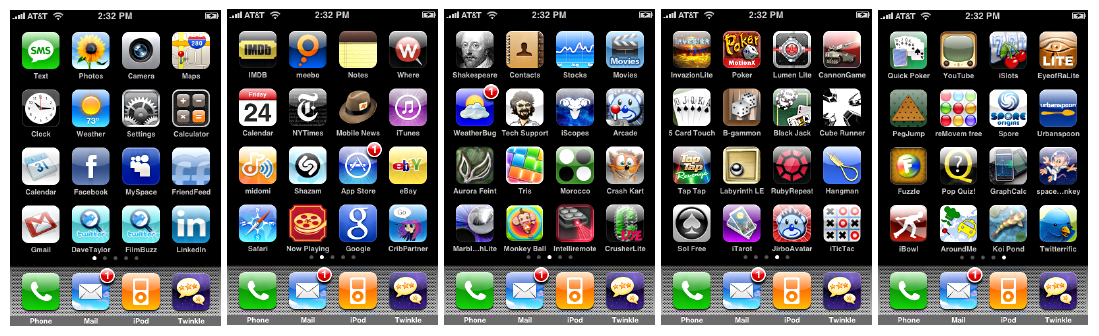
Every time I am asked that question, I start going through old blog posts I have written on the topic with a list of good iPhone apps. That takes me a good twenty minutes every time, and this is a scenario that happens almost daily. For this reason, I decided to compile an organized list of iPhone apps that I use and love. It is important to take into account that this is very much a personal preference and everyone is different. In fact, when I tweeted the question this morning (with a picture of my new twin boys) asking my followers what their favorite iPhone apps were, the answers I got were all very different than the following list.

Having said that, I tried to include apps that anyone would find useful or entertaining and not apps that I use just because they work with my personal daily workflow. When I first got the iPhone, like many other people I started going on an app shopping spree just to see what was out there. Now, after several months, I have gotten rid of the so called “junk” and have left the apps I enjoy using most. I hope you find some gems here that you did not know about.
The following is a list of my personal favorite iPhone apps based on different categories:
Social Apps
 1: Echofon Pro: After testing over 50 Twitter apps, this is the best Twitter iPhone app, hands down!
2: Facebook: One of the best iPhone app designs out there, and some might say the app works even better than the site.
3: Meebo: All your IM networks in one and compared to the many other options, this is the best IM app.
4: Viber: Free high quality calls to your friends who have the app installed. A great Skype competitor. My review here.
5: Skype: Still the Voip industry leader and with video calling supported, this is really a killer app. My review here.
6: Vonage: Call any of your Facebook friends who have this app for free.
7: Whatsapp/Kik: Has been called BBM for iPhone, Android, and BlackBerry (not Kik). Both very good free messaging apps. My review here.
Utilities
1: iLlumination: Just the best free flashlight app, nothing else to it.
2: Bump: Very futuristic app that enables you to transfer data by bumping phones. My review here and here.
3: LogMeIn: Remotely access your computer from your iPhone. A little pricey, but worth it. My review here.
4: QuickInput: Simply the best and fastest QR Code reader available.
5: VLC: I have been a fan of VLC on PC and Mac for years. Now you can play any video on iPhone with this app. My review here. Update: The app was pulled by Apple. Thanks Ari.
6: Boxcar: Probably my favorite app. Gives you notifications for almost all your services such as email, Facebook, Twitter, and much more. My review here.
7: Dropbox: One of the very few services that I use personally and professionally. Keep all your devices in sync. My review here and here.
Photography
1: Instagram: A nicely designed photo sharing app with the ability to add filters to your pictures. My review here.
2: Camera+: Widely accepted as the most professional photography app on iPhone. I do not disagree.
3: 360: Easily take a 360 degree picture of your location and share it with your friends. A very cool app.
4: Burstn: Another photo sharing app with some major advantages over the competition. My review here.
5: ClearCam: An app that enhances your photos and improves their resolution. My review here.
Games
 1: Angry Birds: Widely and accurately regarded as the most addictive game in history.
2: Cut the Rope: The only iPhone game that can even dream of competing with the birds.
3: Rocket Bird: A great flying game with really nice graphics.
4: Paper Toss: Another very addictive game in which you have to throw a piece of paper into a garbage bin. My review here.
5: Talking Tom: If you have kids or are a kid yourself, a must have app. My review here.
6: MultiPong: An engaging game with graphics that you can only find on the iPhone.
7: TinyWings: Had not known about this game till a friend told me about it in a tweet. Seems pretty awesome to me.
Others/General
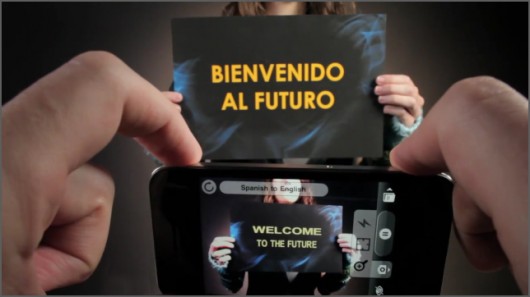
1: WordLens: This app shows me that the future is here. As my title here states, you gotta see it to believe it.
2: Flyscreen: The app I use daily to read the news. My review here.
3: Pulse News: Another beautifully designed app for reading your content.
4: Ocarina: How could I leave this out? Just watch this video!
5: FlightTrack Pro: The best way to track your flights.
6: BaldBooth: Allows you to take a picture of anyone and make them bald. Just very entertaining.
That’s all folks. Just to emphasize again, I am sure if you use an iPhone, there are apps that you love that do not appear on this list. Apps such as Instapaper (which I use on the Web daily, just less on iPhone), Reeder, Evernote, Waze, and Airplay. All these are great apps that I have used, but did not include in the list because they did not make the cut. I hope this list helped you and of course, feel free to share your favorite iPhone apps in the comments below or on Twitter. You can find me here.
Late response but I came across this post when searching if you had posted something on an app I was about to purchase. Firstly, I want to point out that while I’ve tried out whatsapp and kik, none of my bbm’ing friends would join. I have been using pingchat the past few months and have found it to be a great bridge between BBMers and other iPhone/Android users.
Back to the original reason for my looking up this post, I was wondering if you tried Pushmail for push notifications. I used to use E-lert on my jailbroken iPhone 3G and really liked the benefit of not having to open my mail app to see who sent me a new email. While Pushmail is not a free app, the preview option would be worth it. So I thought I’d check with you first before purchasing!